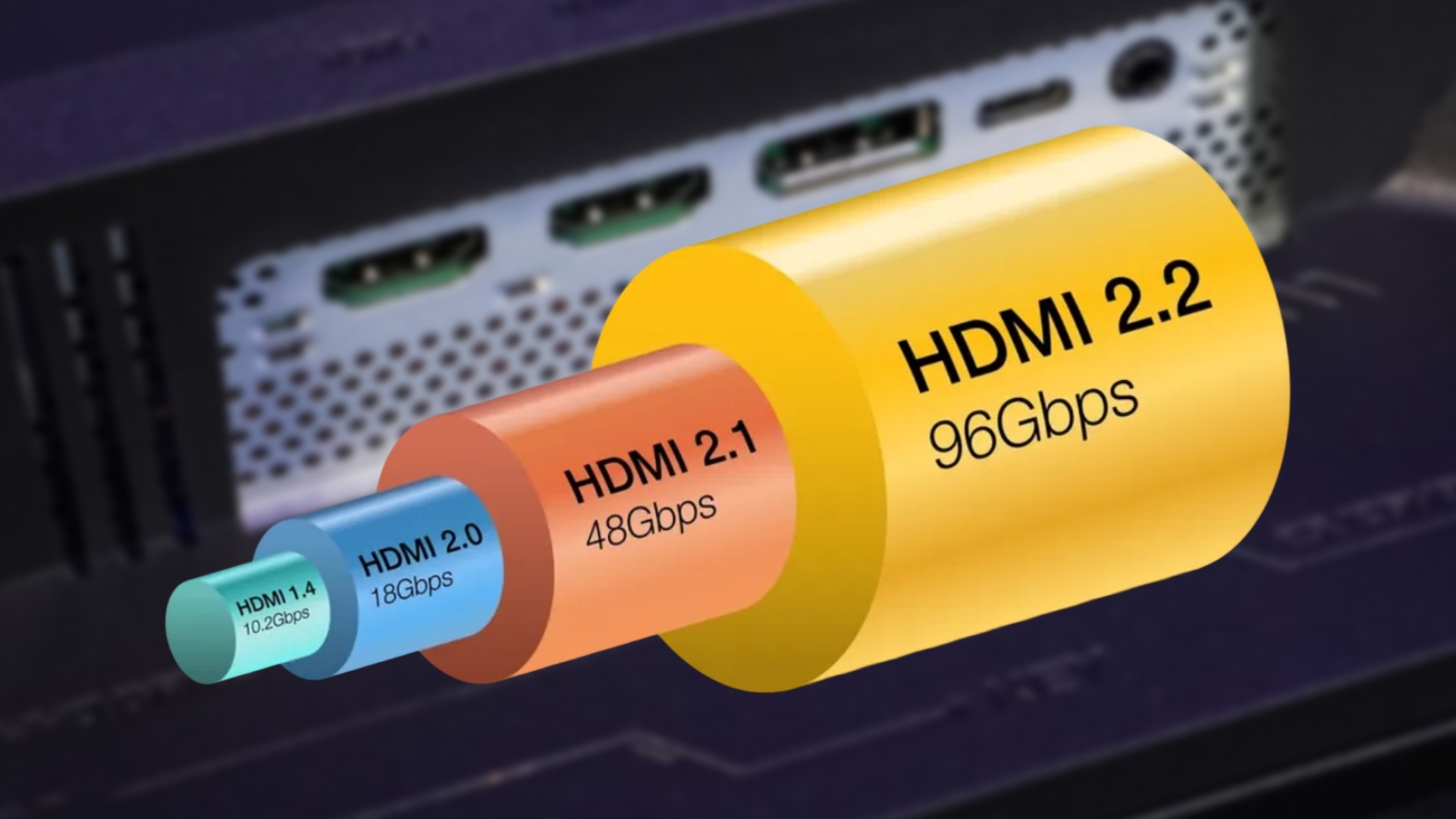
Most people do not care about a port until it becomes the reason a new TV, console, receiver, or gaming monitor feels held back. The HDMI 2.2 Specification matters because it moves the top bandwidth path from the 48Gbps era to 96Gbps, adds the Ultra96 HDMI Cable label, and gives complex home theater chains a better way to handle audio-video timing. The point is not that every American living room needs 16K this year. It does not. The point is that display connectivity is being pulled by high-refresh gaming, bigger screens, denser color, AV receivers, soundbars, and work displays that now carry more than one kind of load. A useful tech upgrade is not the one with the loudest number on the box; it is the one that removes the most confusion from the buying decision. That is why publishers, installers, and buyers who track connected device trends should treat this update as a planning shift, not a panic signal. The official HDMI technology overview lists 96Gbps bandwidth, next-gen Fixed Rate Link, Ultra96 cable support, and Latency Indication Protocol as core parts of the update.
HDMI 2.2 Specification Improvements That Change Bandwidth Planning
The biggest change is easy to say and harder to feel: more room inside the pipe. Earlier HDMI versions already made 4K gaming, HDR movies, eARC audio, and variable refresh rate feel normal for many homes. Version 2.2 aims at the next strain point, where video is not only sharper but faster, richer in color, and passed through more gear before it reaches the screen.
Why 96Gbps matters before 16K arrives
A 96Gbps ceiling sounds like marketing until you picture a real setup. Think of a gamer in Austin using a PC with a high-end graphics card, a 4K 240Hz monitor, HDR turned on, full chroma text clarity, and a capture device for streaming. Each choice asks the cable and port for more space. Raise the refresh rate, keep the color data clean, and the old comfort zone starts to feel tight.
The official release says version 2.2 supports higher formats such as 12K at 120Hz and 16K at 60Hz, along with uncompressed full-chroma 8K at 60Hz and 4K at 240Hz in 10-bit and 12-bit color. Those are not casual Netflix targets for a family room. They are headroom targets for gaming, medical imaging, studio review rooms, simulation, signage, and production displays where clarity and motion both matter.
The counterintuitive part is that the most practical benefit may arrive before 16K content does. Extra HDMI bandwidth can help keep compression away from setups that value sharp text, clean color edges, or fast motion. For a home office display, that may matter more than a headline resolution. A small font on a spreadsheet can reveal weak chroma handling faster than a movie scene can.
That also changes how reviewers and buyers should judge new screens. A display is no longer only a panel with a nice peak brightness number. It is a full signal path, from source output to cable to port controller to the screen’s own processing. When one part cannot carry the mode the panel promises, the spec sheet becomes a half-truth. That is where extra headroom earns trust.
How Ultra96 HDMI Cable labels reduce shopping mistakes
Cable names have been a mess for years. Many shoppers have seen “4K,” “8K,” “high speed,” and “premium” used on packaging with little sense of what the cable has been tested to carry. Version 2.2 tries to make the next tier clearer through the Ultra96 HDMI Cable name. The label matters because the cable is the physical part most people replace last, even when it is the first part causing dropouts.
HDMI Licensing says the Ultra96 HDMI Cable supports up to 96Gbps and is meant to support all version 2.2 applications. It also says Ultra High Speed HDMI Cable, introduced with HDMI 2.1, is for system setups up to 48Gbps. That split gives buyers a cleaner rule: match the cable tier to the highest bandwidth your devices claim, not to the biggest number printed in a product listing.
For a Best Buy shopper or a local AV installer in Phoenix, the useful move is not buying the thickest cable on the shelf. It is looking for the certification label, scanning the QR code when available, and checking that the model length has been tested. Longer runs behind a wall or across a media room are where weak cables tend to betray you. A certified cable does not make an old TV faster, but it can stop a new chain from being blamed on the wrong component.
The boring packaging detail may save the most money. When a cable fails at a demanding setting, many people return the monitor, blame the console, or pay an installer to chase a ghost. A clear certified label narrows the suspect list. That is not glamorous, but it is exactly what a mature connection standard should do for ordinary buyers.
Why Latency and Sync Matter as Much as Raw Speed
Bandwidth gets the headline because it is clean and numeric. Delay is messier. You hear it when a soundbar fires a line of dialogue a hair late. You feel it when a console responds after your hands have already moved. Version 2.2 treats timing as part of display connectivity, which is the grown-up move. A beautiful signal loses charm when it arrives out of step.
What LIP fixes in receiver and soundbar chains
Modern living rooms often route video and audio through several stops. A streaming box runs into an AV receiver, the receiver sends video to the TV, audio may return through eARC, and a soundbar or speaker system adds its own processing. Each step can add delay. One device may know its own timing, yet the whole chain still feels off.
Latency Indication Protocol, or LIP, is meant to improve audio and video synchronization, with special value in multi-hop systems such as those using receivers or soundbars. That detail matters because many American homes have moved away from simple source-to-TV wiring. A Costco TV, a game console, a Roku, a soundbar, and an older receiver can live together in the same cabinet. The mess is normal.
The non-obvious insight is that sync problems are often blamed on the wrong product. People blame the TV because they see the TV. The delay may sit in the audio chain, the receiver settings, the source device, or the way the devices report timing to each other. Better timing data does not remove every bad menu setting, but it gives future gear a cleaner way to coordinate.
This matters for families more than spec sheets admit. A parent may notice lip sync on local news, while a teenager notices input lag in a game. Both complaints can come from timing, but they show up in different ways. Treating latency as part of the standard moves the conversation beyond “the picture looks sharp,” which was never enough.
Why gamers should care even before buying a new TV
Gamers tend to watch refresh rate first. That makes sense. A 120Hz or 240Hz display feels different the moment you move a camera in a shooter or racing game. Still, the chain matters as much as the screen. Variable Refresh Rate, Auto Low Latency Mode, and Quick Frame Transport already shaped the HDMI 2.1 era, and those features remain part of the larger feature set listed for the current version.
A practical example: a PlayStation or gaming PC may be connected through a receiver because the family wants better speakers. That same receiver can become the weak point if it cannot pass the signal the display and source are able to support. In that case, the screen may be ready, the source may be ready, and the experience still falls back to a lower mode.
For gamers, version 2.2 is less about rushing to replace a working setup and more about reading the whole chain. The cable, receiver, TV port, monitor port, and source output all have to agree. One older link can pull the system down. That is annoying, but it also protects your wallet: upgrade the limiting part, not the entire room.
A second lesson sits under the gaming angle. Speed is not always about winning a match. It can also mean the display changes modes without a blank pause, the audio stays locked to the action, and the desktop remains crisp when a PC switches from work to play. The best gaming setup often feels calm because nothing calls attention to itself.
How Version 2.2 Compares With the HDMI 2.1 Era
The 2.1 generation should not be treated like junk because a newer number exists. That mistake happens every time a standard changes. HDMI 2.1 brought 48Gbps signaling, eARC, VRR, ALLM, QFT, and QMS into the mainstream conversation. Many TVs sold in the United States still have years of useful life because those features match what most streaming boxes and consoles ask for today.
The 48Gbps ceiling still works for many homes
A household using a 4K TV, Apple TV, Blu-ray player, and current console may not hit the limits that version 2.2 is built to solve. Movies at normal frame rates, sports broadcasts, and most console games do not force a 96Gbps connection. For that family, chasing the new cable label before buying any matching device adds cost without visible gain.
The official cable guidance says Ultra High Speed HDMI Cable entered the market in 2020 and applies to systems that support up to 48Gbps. That is still enough for many 4K120 setups when the TV, source, and cable are all honest about support. If a current chain is stable, there is no merit badge for tearing it apart.
The strange part is that the smarter buyer may skip the new cable today and still plan around it tomorrow. If you are finishing a basement theater in Ohio and running cable through walls, the labor is harder than the cable purchase. In that case, planning for a higher tier can make sense even if the first TV on the wall does not need it.
That is where the “previous versions” comparison becomes practical. Older HDMI gear may be enough on a TV stand, where changing a cable takes ten seconds. It is a different call inside drywall, above a projector, or through a conduit in a finished room. The same technical limit can be harmless in one place and expensive in another.
Backward compatibility does not mean equal performance
Version 2.2 is backward compatible with earlier HDMI versions, according to the HDMI Forum overview. That means older devices can still connect in many cases. It does not mean an older port can move a 96Gbps signal, enable every new feature, or turn an old receiver into a modern pass-through device. Compatibility keeps the picture from going dark; it does not grant new hardware powers.
This is where many shoppers get burned. A TV listing may say HDMI, a receiver may say HDMI, and a cable may say HDMI, yet each one may belong to a different performance class. The logo alone is not enough. You have to check the version features, supported bandwidth, port labels, and certified cable tier.
A fair comparison between generations should ask a plain question: what problem are you solving? If the answer is “my 4K60 movie night works fine,” older gear may be enough. If the answer is “I want a PC monitor path for 4K240 with clean color and room for future devices,” the newer tier starts to earn its place. Good display connectivity is not about owning the newest label. It is about removing the bottleneck you can prove.
For retailers, this is a chance to explain instead of upsell. A good product page should say which ports support which modes, which cable tier is required, and whether every HDMI input has the same ability. Clear information lowers returns. It also keeps buyers from treating HDMI as a magic word that means every feature works everywhere.
Where Display Connectivity Goes Next in American Homes
The home screen is no longer one thing. It is a TV at night, a game display on weekends, a workout screen before work, a laptop extension during tax season, and a video-call surface when relatives visit. That mix changes what buyers should expect from one cable and one port. Version 2.2 lands in that shift, where living rooms and desks are starting to borrow from each other.
Living rooms, desks, and classrooms are merging
A school district buying large classroom displays, a hospital using high-detail review monitors, and a family building a gaming room are not the same customer. Yet they share a problem: more pixels, faster motion, and more devices in the chain. The same standard has to serve consumer gear and professional gear without making setup feel like an engineering exam.
The HDMI Forum says the new update supports applications across a wide device range and includes higher resolutions, higher refresh rates, and next-gen Fixed Rate Link technology. That broad aim is why the update should be seen as infrastructure, not only as a TV feature. The same display path can shape digital signage in a mall, a sports bar video wall, or a creator desk in Los Angeles.
Here is the odd part: most people will benefit from the new rules through products they never identify by version number. They will buy a monitor that holds a high refresh rate better, a receiver that reports timing more cleanly, or a cable package that is harder to fake. Standards do their best work when the buyer does not have to think about them for long.
There is also a workplace angle hiding inside the home theater talk. Many Americans now connect laptops to TVs for presentations, training, video calls, and hybrid meetings. Text clarity, stable switching, and audio sync matter in those moments. A port standard built for future screens can quietly improve rooms that are not entertainment-first at all.
The upgrade path should follow devices, not hype
A good upgrade path starts with the source and display, then checks the middle. If your next graphics card, console, or media player cannot output the higher mode, a new cable does not create it. If your TV has only older ports, a newer receiver will not force the panel to accept more data. The chain is only as strong as the strictest link.
For many U.S. buyers, the next smart move is simple: keep current certified Ultra High Speed cables for 48Gbps setups, use Ultra96 HDMI Cable for gear that claims 64Gbps, 80Gbps, or 96Gbps support, and be cautious with marketplace listings that avoid official labels. HDMI Licensing says Ultra96 products may use bandwidth levels such as 64Gbps, 80Gbps, or 96Gbps, and that products using the Ultra96 feature name require the Ultra96 cable to support their maximum bandwidth.
A buyer guide on choosing a future-ready home theater setup should place this decision after screen size, room layout, and source devices. A gaming monitor buying guide for high refresh rates should do the same for PC users. The cable is not the star. It is the road. You notice it only when traffic jams.
The best rule is to upgrade at the edge of a real change. Buy the cable when you buy the device that needs it. Replace the receiver when it blocks a mode you use. Pick a monitor based on the work or game you will run, then match the connection to that demand. Hype asks you to buy early. Good planning asks you to buy in order.
Conclusion
The safest reading of this update is practical, not dramatic. Version 2.2 gives the HDMI ecosystem more room for faster video, denser color, cleaner certified cable tiers, and better timing across audio-video chains. The HDMI 2.2 Specification is a stronger answer to future displays than to most living rooms already working well today. That matters because many Americans do not replace every device at once. They add a soundbar, then a console, then a monitor, then a receiver, and the weak link appears later. Before buying anything, check the source, screen, middle gear, port support, and cable certification in that order. The official HDMI technology overview is worth reading when a product claim feels vague. Upgrade when the new standard solves a problem you can name, not when a box tries to make your current setup feel old.
Frequently Asked Questions
Is HDMI 2.2 better than HDMI 2.1 for gaming?
Yes, but mainly for future gaming hardware and high-end PC setups. The newer version allows higher bandwidth, which can support higher refresh rates and richer video formats. Current consoles and many TVs still run well on HDMI 2.1 features such as VRR and ALLM.
Do I need an Ultra96 cable for a 4K TV?
Only if your source and TV need bandwidth above the 48Gbps class or the product calls for the Ultra96 tier. A normal 4K TV used for streaming, cable, or common console play may work fine with a certified Ultra High Speed cable.
Will older HDMI devices work with version 2.2 gear?
Yes, backward compatibility helps older devices connect to newer equipment. The connection will still follow the limits of the older device or cable. A newer port cannot make an older source send higher bandwidth video than it was built to provide.
What makes 96Gbps useful for display connectivity?
The added bandwidth gives future displays more room for high resolution, high refresh rate, full chroma, and deeper color. That is useful for gaming PCs, production monitors, simulation displays, medical viewing, and other setups where detail and motion both matter.
Can HDMI 2.2 fix audio delay with a soundbar?
It can help future devices handle timing better through Latency Indication Protocol. That does not promise a cure for every setup, since settings and older gear still matter. It should make complex chains easier for compatible devices to coordinate.
Should I wait for HDMI 2.2 before buying a TV?
Not unless the TV you want lacks a feature you know you need. A strong HDMI 2.1 TV can still be a smart buy for 4K movies, sports, and current console gaming. Wait only when your next source needs the newer bandwidth.
How can I tell if a cable is certified?
Look for the official cable certification label on the package or unit of sale. For Ultra96 and Ultra High Speed cables, the label should identify the official cable name. When a QR code is present, scan it to verify the cable model and length.
Does higher HDMI bandwidth improve picture quality by itself?
No. Higher bandwidth creates room for demanding formats, but the source, content, display panel, settings, and cable all matter. A 4K movie will not become sharper because it travels through a higher-capacity cable. The benefit appears when the signal needs that extra room.